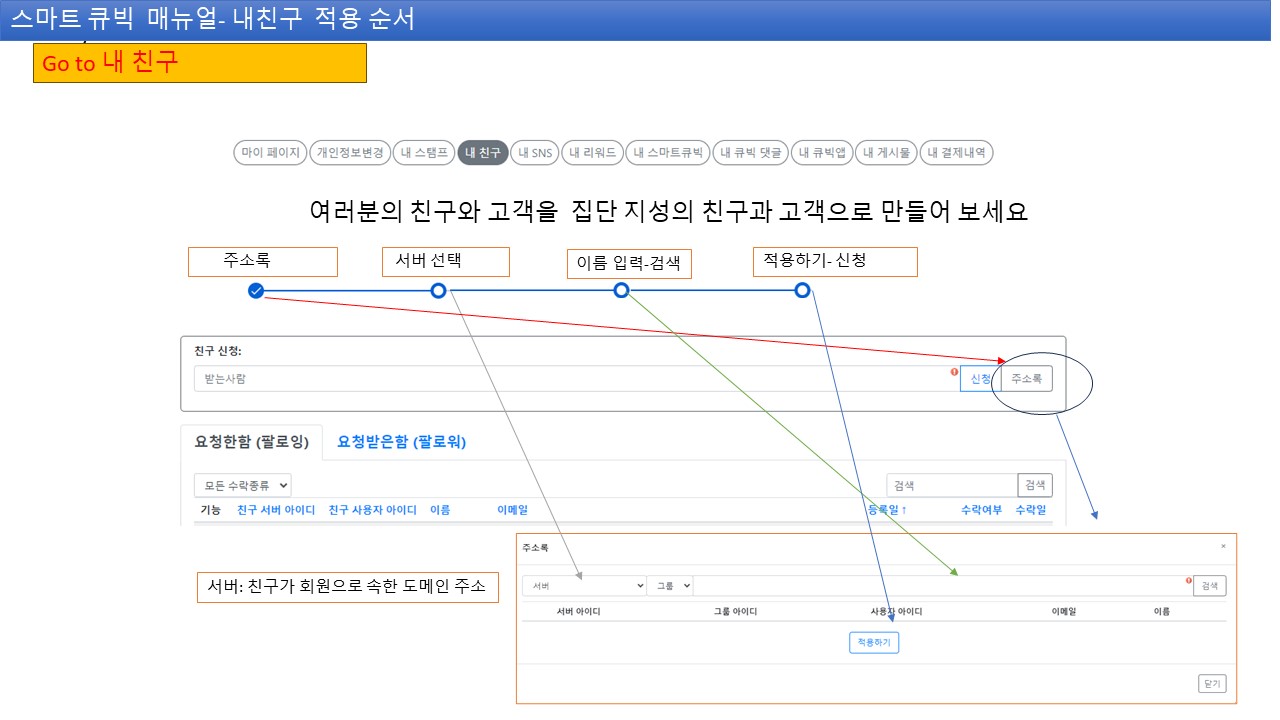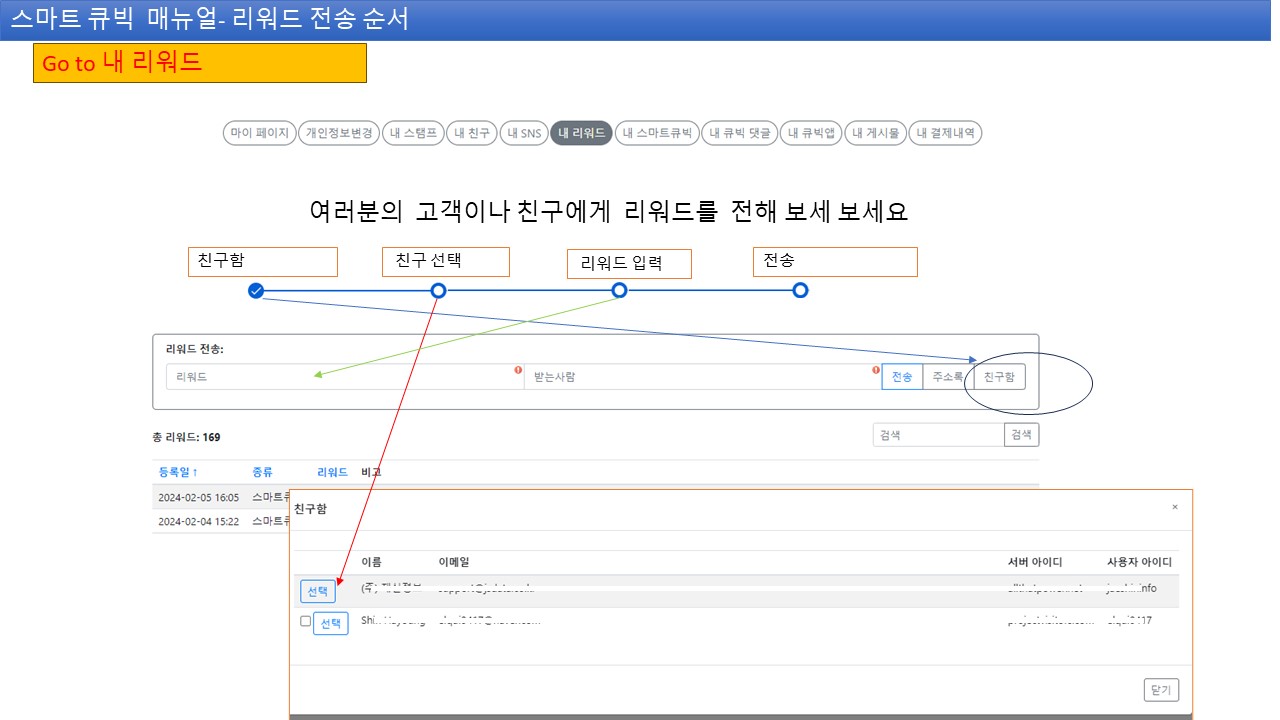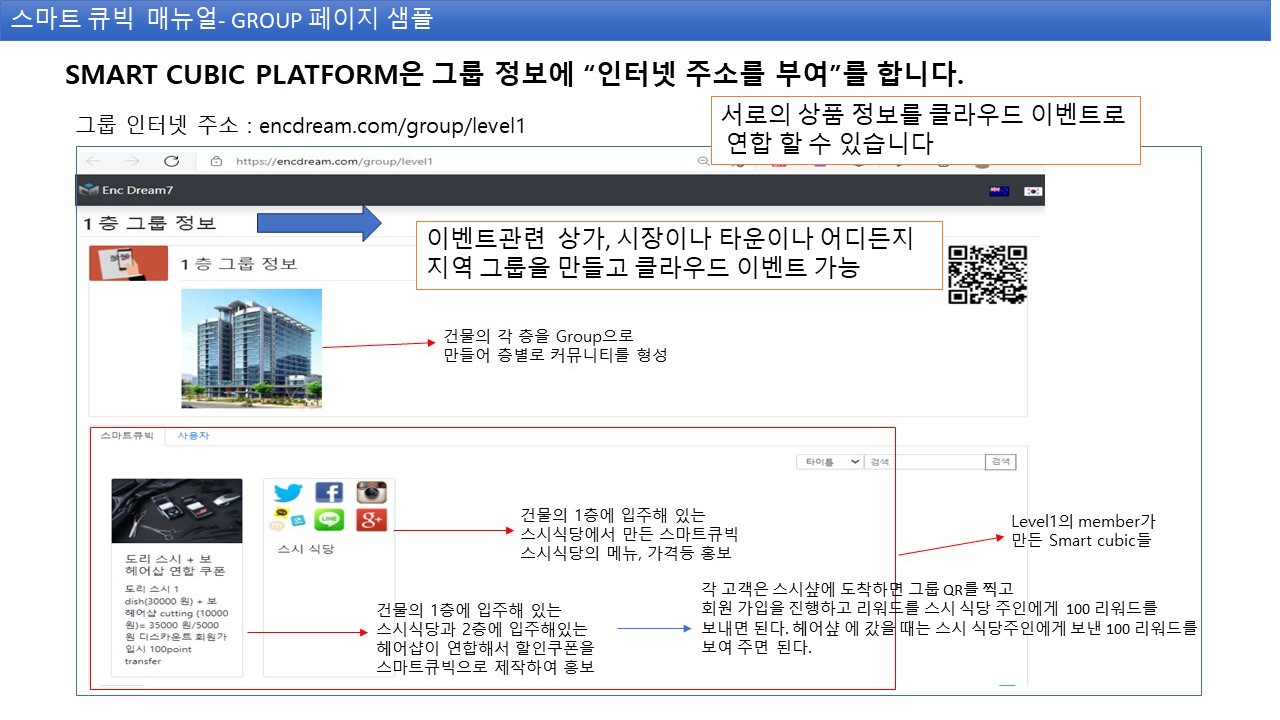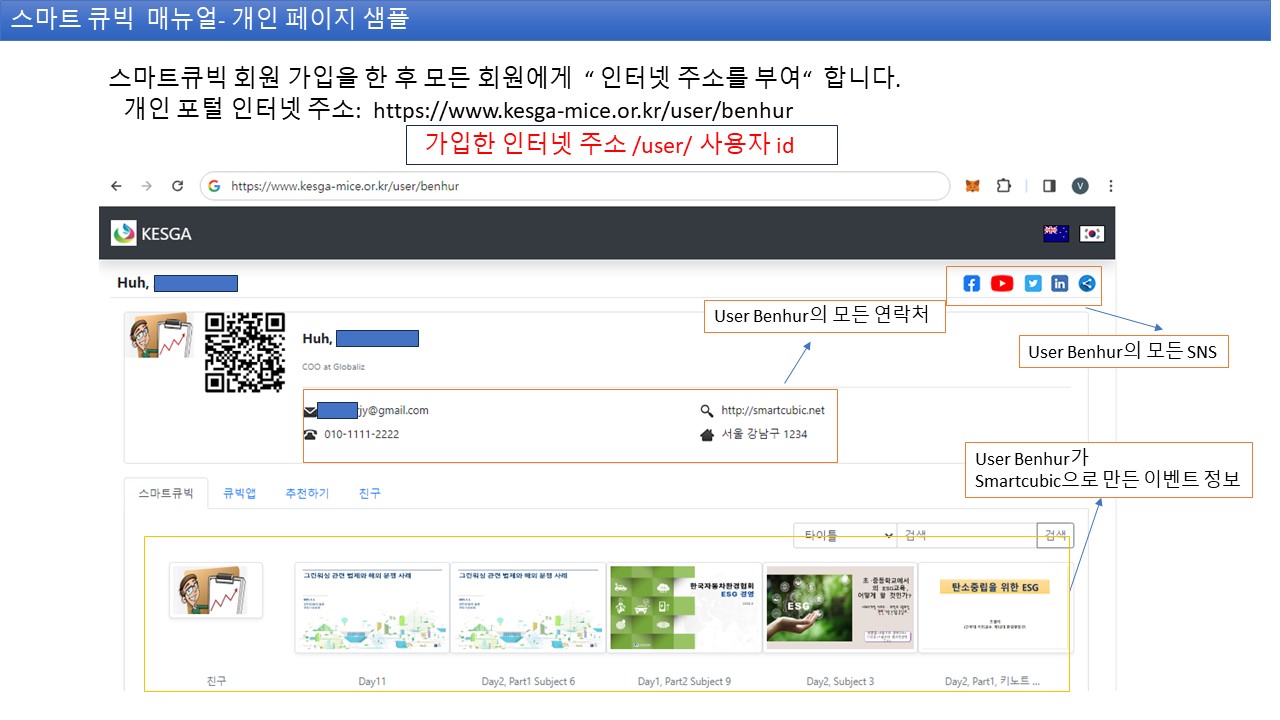

What is the Smart Cubic Platform?

Information Unit

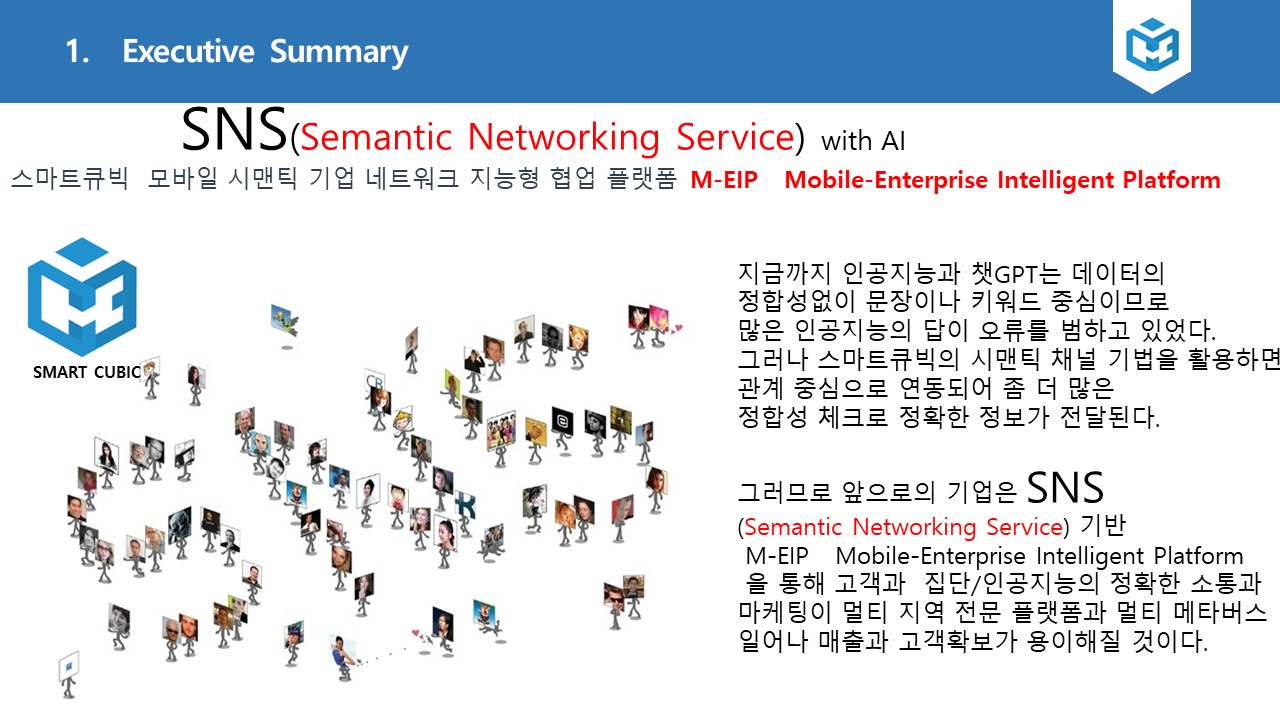
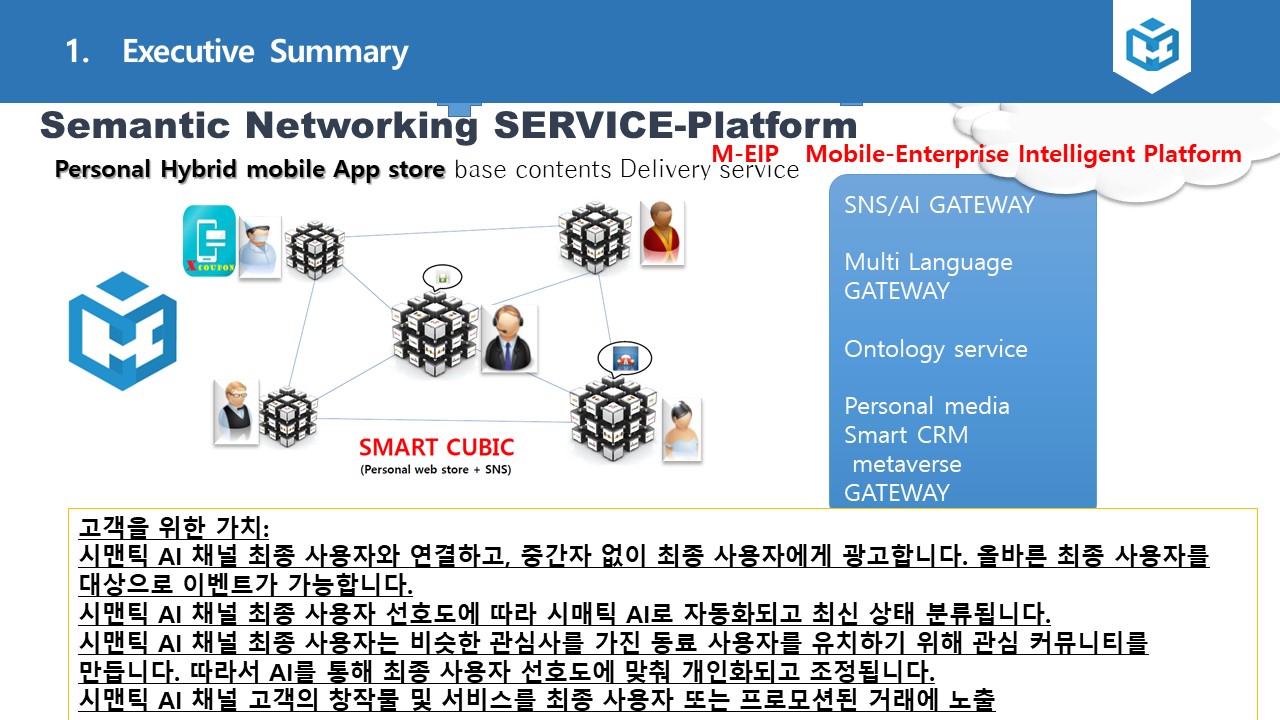
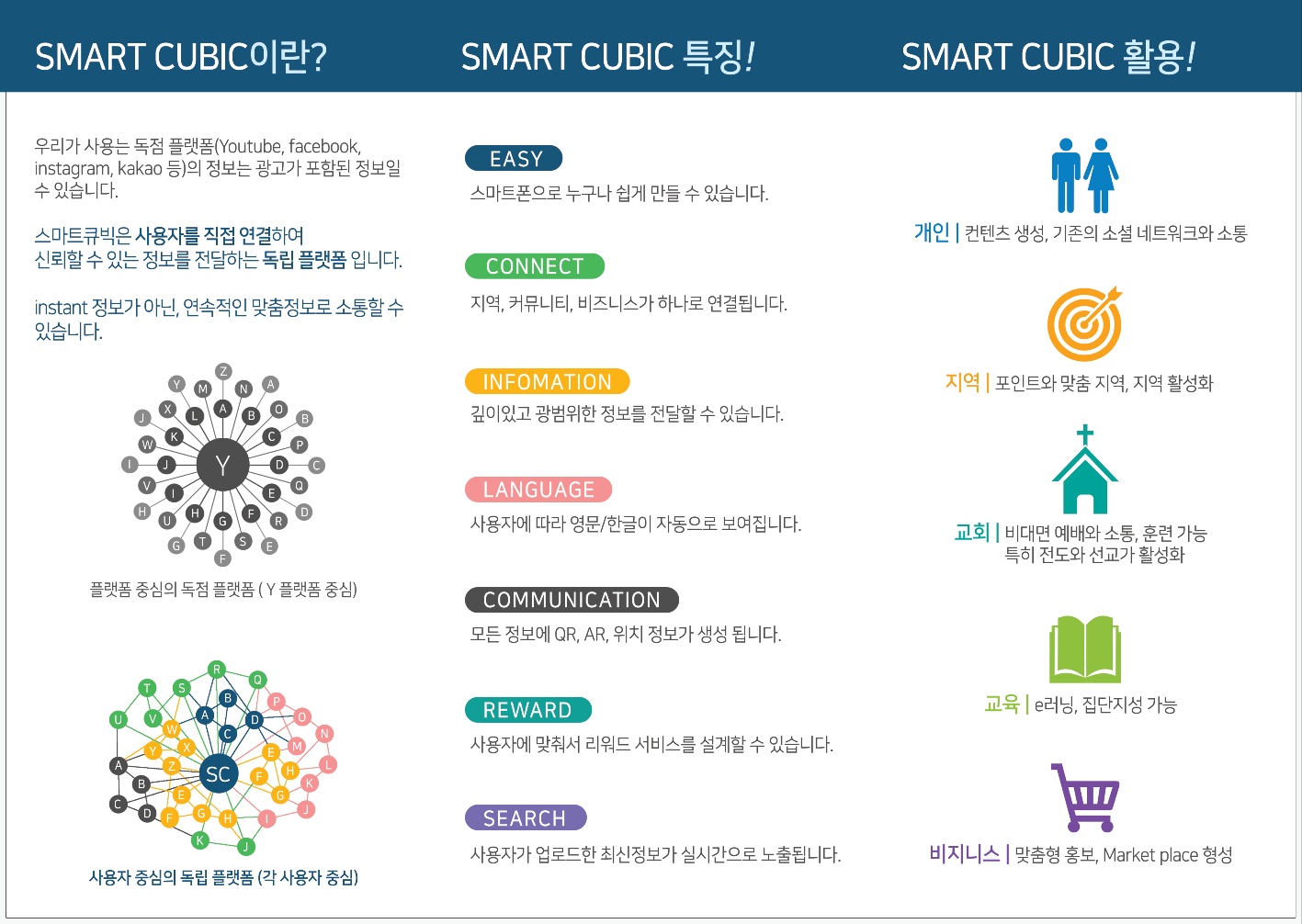
Smart Cubic is a unit for creating and sharing digital information such as products, services, advertisements, and announcements. All information is systematically managed. This unit is designed with the user in mind, simplifying the entire process from information creation to distribution. For example, product information entered is automatically categorized, making search easy.

Unique Internet Address

Every Smart Cubic created is assigned a unique internet address, making it easy to access and share. You can access information anytime, anywhere through this address, and enhanced security features ensure safe data sharing. The shared address is permanent and automatically updates upon changes.

Information Dissemination and Marketing

Share the Smart Cubic address through social media like KakaoTalk to easily disseminate information and maximize promotional effects without extra cost. Built-in analytics tools for marketing campaigns allow you to check share counts and views in real-time. Use this to provide content optimized for your target audience.

Semantic AI Search Innovation

Information retrieval becomes easy with intuitive icon-based search, improved information accessibility within communities, and a structured Semantic Web 3.0 foundation. An AI-based recommendation system suggests relevant information based on user search patterns. This feature is especially useful when efficiently navigating large amounts of data.

Key Functions and Features

Personal Homepage (Personal Portal)

Every member is provided with a unique internet address. This address is optimized for personal branding. It can include all personal information such as self-introduction, business card, contact details, and social media links. Easily customize it using templates. Use it as a personal homepage to effectively promote your expertise. You can highlight your career with the portfolio addition feature. Visitor analytics tools allow you to track who has visited.

Smart Cubic (Information Unit)

A tool for promoting and marketing various digital information, such as products, services, and advertisements, on a global network. Every Smart Cubic is automatically assigned a unique internet address that can be shared on social media. Dissemination methods can be freely controlled by setting various options like public visibility and automatic transmission. Collaboration features allow multiple users to edit the Cubic jointly.

Group Page

Can create local communities, clubs, and shopping mall groups. Real-time communication is possible with in-group chat features. Can create groups for specific shopping districts, markets, villages, and host local cloud events. Simplify participant registration with event management tools. Can also create floor-by-floor communities for building tenants. Instantly deliver important announcements with the notification system. Clearly distinguish administrator and member roles with permission settings.

Cubic App (My Cubic App)

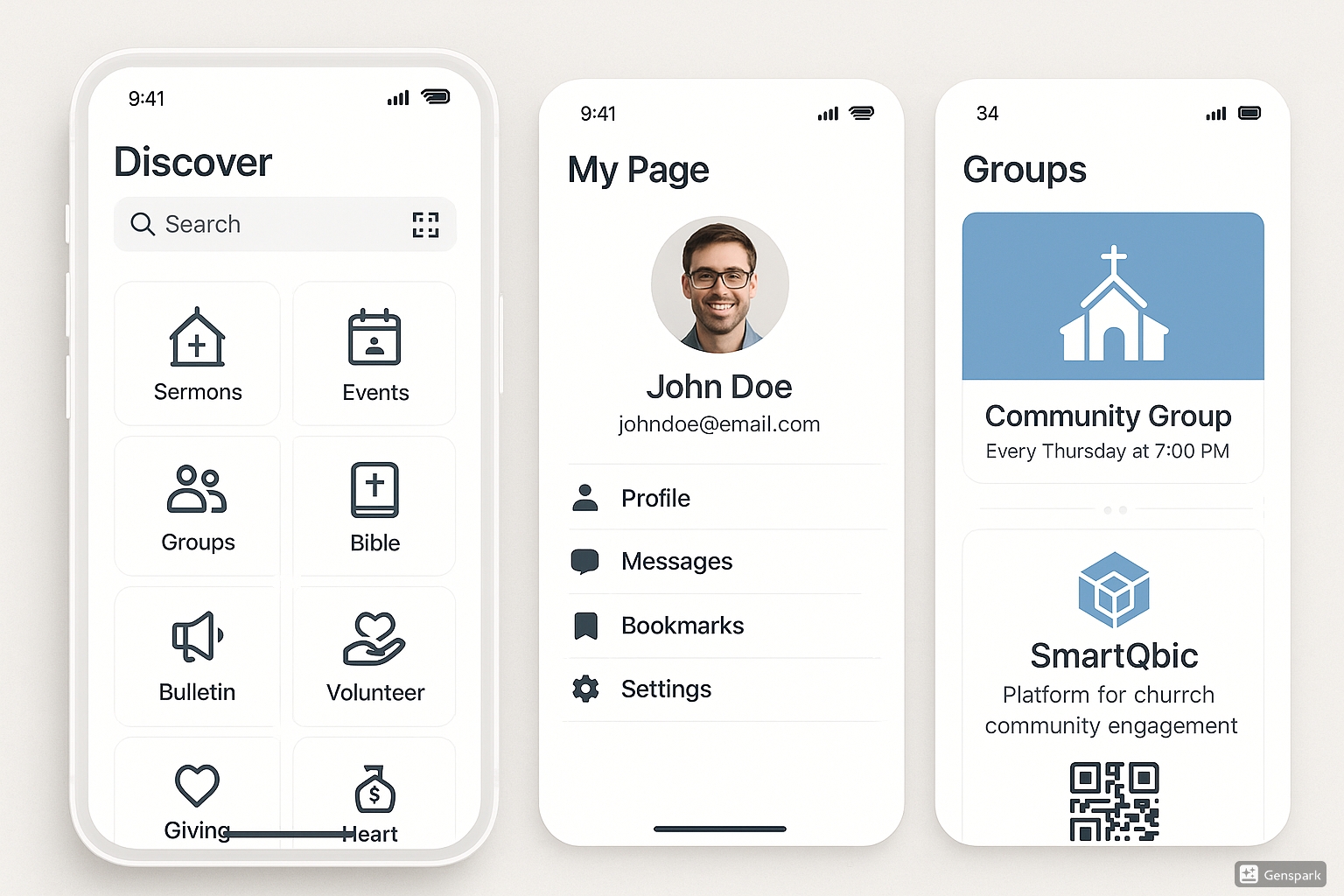
A multi-design mobile hybrid app accessible with icon-based and category-based search in various environments. Supports both iOS and Android and synchronizes with the web. Provides convenient use with stamp features and event offline check-in mode.

Reward Program

Provides rewards to active users to encourage participation. New members receive 100 rewards upon registration and can receive discounts at local merchant promotion stores. General customers can attract local merchants and receive additional rewards when they do. Local merchants can check reward history and create customized campaigns.

Smart Cubic Banner

Smart Cubic Utilization

Efficient Information Delivery

Deliver information quickly and accurately through a cost-effective promotion channel. Maintain the latest information with real-time update features. Analyze delivery effectiveness and optimize with analytics tools.

Community Activation

Strengthen communication among members and encourage participation to foster a more active community. Easy consensus building with forum and voting features. Increase participation rate with event notifications.

Improved Information Accessibility

Anyone can easily access the necessary information with intuitive icon-based search. Prioritize frequently used information with a customized dashboard. Ensure convenient use for all users by complying with accessibility guidelines.

Support for Various Environments

Seamless access is possible across various digital environments, including mobile and web. Automatic data synchronization between devices with cross-platform support. Ensure safe use with security protocols.

Administrative Efficiency

Significantly improve administrative efficiency by digitizing announcements, schedules, and document management. Reduce repetitive tasks with automated workflows. Track change history with document version control.

Expanded Mobile Accessibility

Maximize accessibility through QR code scanning and mobile app integration, and enable mass messaging via social media and email. Instantly receive important updates with push notifications. Provide region-specific content with location-based services.

Smart Cubic Banner

Core Functions and Features

Smart Cubic overcomes the limitations of Web 1.0 and 2.0 and provides intelligent features that maximize the value of information.

Function Category Detailed Description
Semantic AI Search Understands information meaning/relationship, identifies user intent, AI recommendation system. Supports **intuitive icon-based search**.
Real-time Synchronization **Automatic information updates** and dynamic content provision. Ensures data accuracy and timeliness.
Personal Media Building Personal portal creation (introduction, business card, social link customization), visitor analytics tools provided.
Multimedia Support Video/image embedding, **automatic QR code generation**, mobile app (Cubic App) synchronization (iOS/Android).
Global Network **GIS-based real-time sharing**, symbol-based sharing, group chat/event management system.
Security/Accessibility Supports **2FA (Two-Factor Authentication)**, **offline check-in** and location-based services, push notification feature.

How to Use (Simplified User Manual)

Smart Cubic usage consists of simple steps like the following, making it easy for anyone to get started. Mobile and web synchronize in real-time.

1

Membership Registration and Setup

'Sign Up' then enter ID/Email, verify email, and complete profile (2FA activation recommended).

2

Login and Dashboard

After 'Login', adjust personal settings and notifications in 'Change Personal Settings'.

3

Personal Portal Creation

Create a portal with a unique address and customize it by selecting a template.

4

Smart Cubic Creation and Sharing

Create a Cubic by setting categories and keywords via 'Add' in 'My SmartCubic' then share the QR/Address.

5

Group Page Operation

Apply for group creation after collecting 30 personal pages (local/club), and start chat/event/permission management.

Advantages and Target Users

Key Advantages

Provides accurate and up-to-date information, personalized experience, and easy creation/sharing features. Excellent for **business efficiency**, such as e-commerce and small business promotion, solving information overload and non-real-time issues of existing platforms.

Target Users

Individuals (students, experts, creators), Communities (clubs, groups, community members), Businesses (e-commerce operators, global business), Institutions (churches/schools, local communities, ESG/agriculture-related organizations).

Smart Cubic Usage Process

1

Membership Registration and Initial Setup

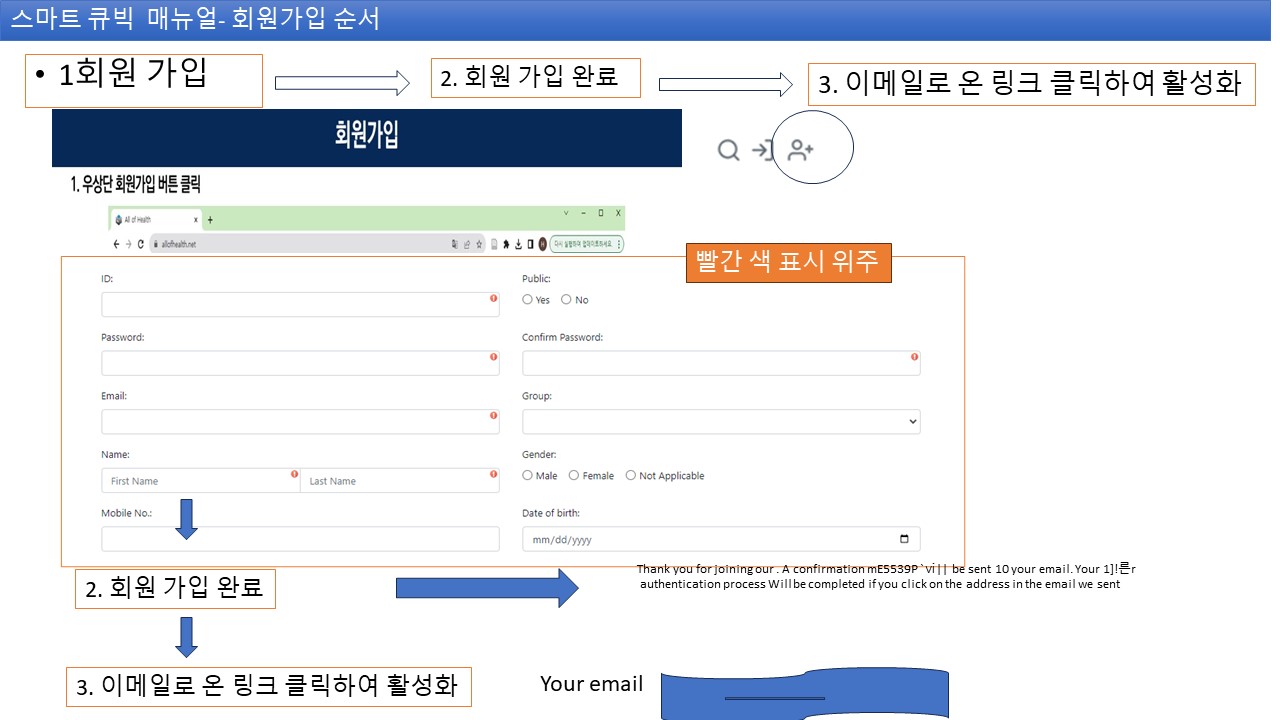
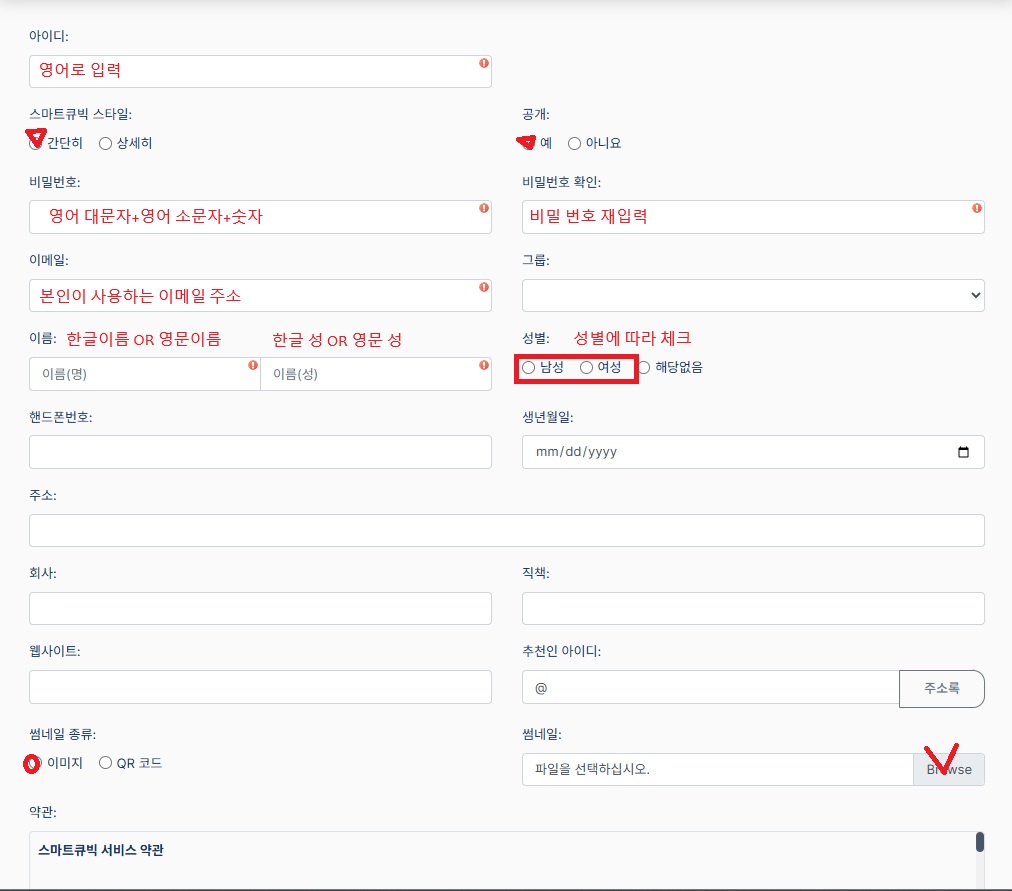
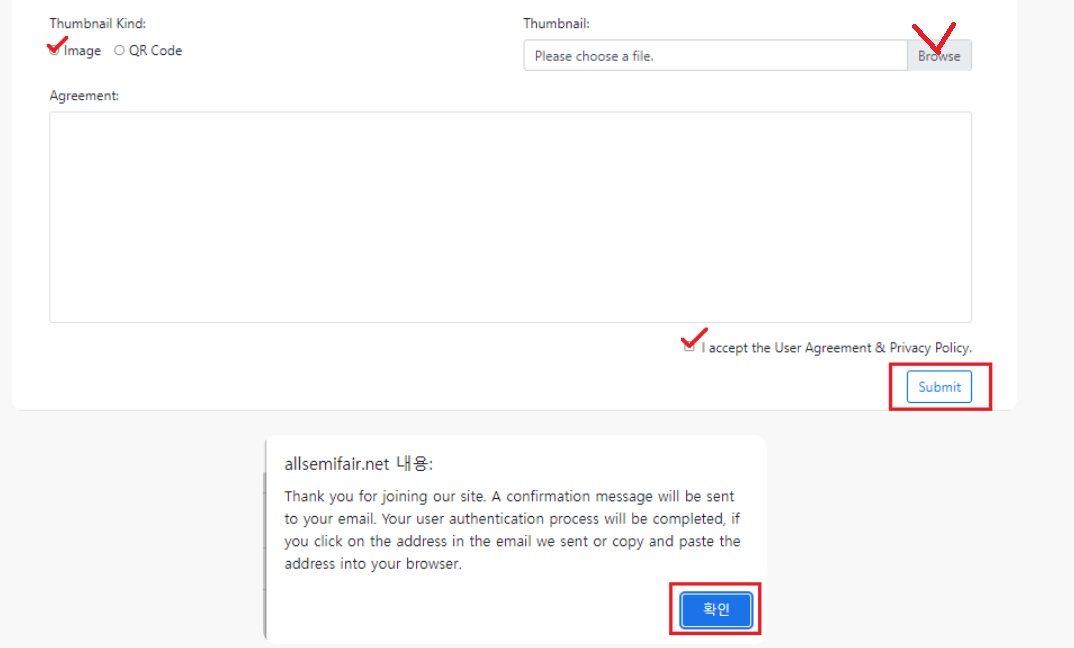
Click the 'Sign Up' button on the top right of the Smart Cubic homepage. Enter required information such as ID, password, email, name, and phone number, then click the link sent via email to activate the account. Complete your account by entering a profile picture and additional information after activation. Security settings can be strengthened during this process.

Membership Registration Registration Screen

1. Membership Registration Screen

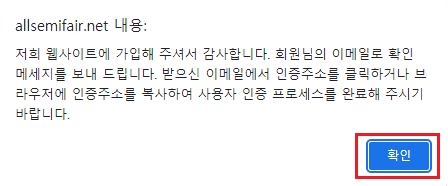
Membership Registration Screen

2. Membership Registration Complete

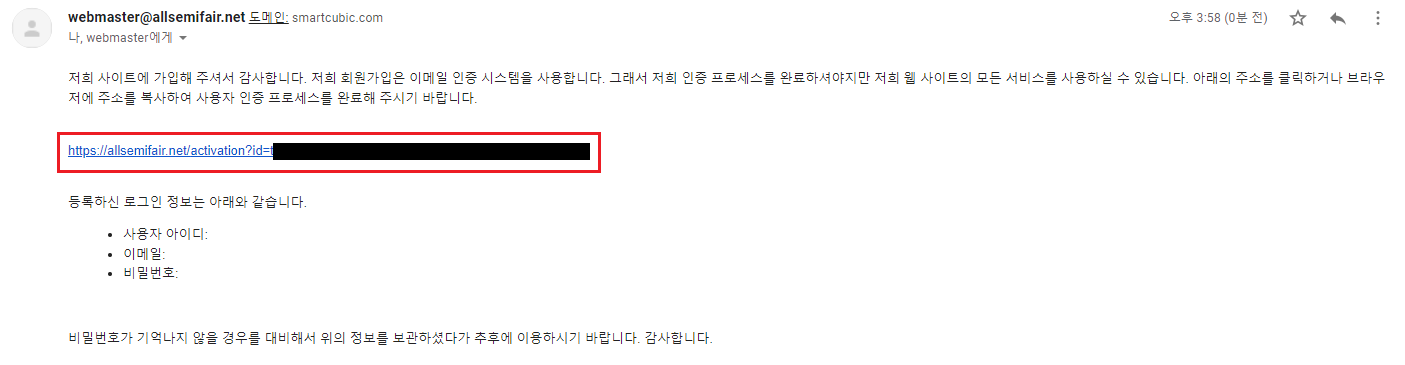
Membership Registration Complete Email Verification

3. Click the Activation Link Sent by Email (Check your inbox or spam folder)

2

Login and Dashboard Access

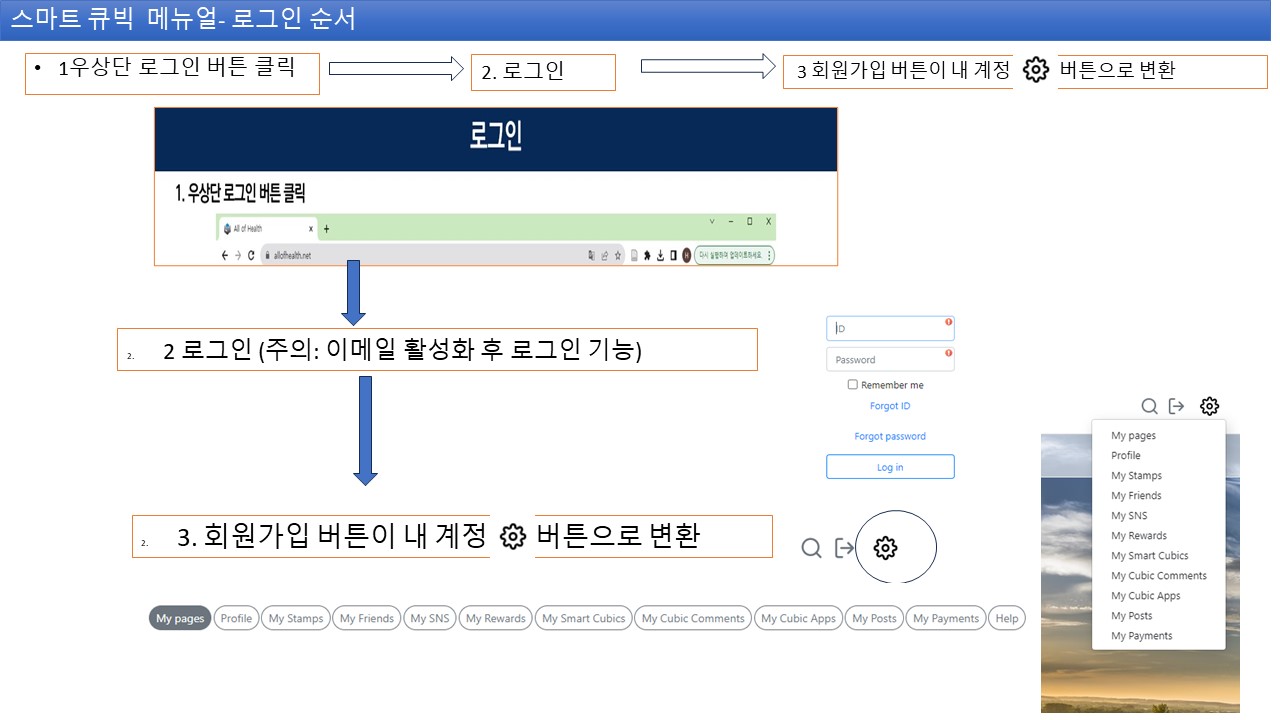
After email verification is complete, use the 'Login' button to log in. The button changes to 'My Account' upon login, and clicking it moves you to My Page. Adjust personal settings and customize notification preferences on My Page.

Login and Account Settings

Log in after email verification and set up personal information and profile in the 'My Account' menu. (If not received in your email, check your inbox or spam folder). Strengthen security with 2FA setup.

Login Screen Screen After Login My Page Personal Information Settings
3

Personal Portal Page Creation

Every member is assigned a unique internet address to create a personal portal. It can be used as a tool to promote oneself to acquaintances, including self-introduction, business card, contact details, and social media links. Easily build a professional portal by selecting a template and customizing it.

Personal Portal Address Personal Portal Settings Template Selection Add Portfolio
4

Smart Cubic Creation and Sharing

Click the 'Add' button in the 'My Smart Cubic' menu to create a new Smart Cubic. Set the menu, category information, and keywords, then maximize promotional effects by sharing the unique internet address on social media. Easily manage and disseminate content through automatic QR code generation and collaboration features.

Cubic Creation Category Settings Keyword Settings Cubic Sharing
5

Group Page Opening and Operation

Can create local groups and host cloud events. It's also possible to form communities between tenants by designating each floor of a building as a group. After applying for group creation, operate efficiently through chat features, event management, and permission settings. Maintain stable operation with in-group rule setting and moderation tools.

Group Creation Group Settings Invite Members Start Activity Operation Tools

Start Your Digital Transformation with Smart Cubic Semantic AI

The Smart Cubic platform helps you effectively manage, communicate, and grow your information. It can be used in various industries and reflects the latest trends with continuous updates.

Achieve your vision and mission more effectively with an innovative platform utilizing Semantic Web 3.0 technology. We provide community support and expert consulting services.

Start Free Trial